
API for Getting Request Approvers From an External Service
Huntflow can automatically get the list of approvers for a vacancy request from your service. The employee does not need to enter the approvers manually. After the employee submits the request, Huntflow asks your service for the list of approvers over HTTP. This document describes the interaction protocol: what data Huntflow sends in the request, and what response your service must return.
How it works
When an employee submits a vacancy request for approval, Huntflow sends one synchronous HTTP request to the URL in the integration settings. The request contains the request data. Huntflow waits for a list of approver email addresses in the response. Your service must process the request and respond in real time. This process does not use callbacks or webhooks.
Request
POST <URL from the integration settings>
Content-Type: application/json
X-Huntflow-Event: vacancy_request.resolve_attendees
X-Huntflow-Delivery: <uuid, unique for each call>
- Timeout: 30 seconds. If the service does not respond in this time, the call fails.
- Huntflow does not follow redirects (3xx).
- Huntflow reads at most 64,000 characters of the response body.
Authorization
The form settings specify one of three authorization types:
| Type | How it is sent |
|---|---|
| No authorization | Huntflow does not send the Authorization header |
| Bearer token | Authorization: Bearer <token> |
| Basic (username/password) | Standard HTTP Basic authorization (Authorization: Basic <base64(username:password)>) |
Request body
The request body contains the request data as filled in at the time of submission for approval. All reference fields (department, region, and so on) appear as full objects:
{
  "account": { "id": 500, "nick": "romashka", "name": "Romashka LLC" },
  "author": { "id": 101, "email": "recruiter@romashka.com", "name": "Olga Klenova" },
  "account_vacancy_request": {
    "id": 8,
    "account": 500,
    "name": "Standard hiring request",
    "attendee_hint": null,
    "attendee_required": true,
    "active": true,
    "restricted_for": [],
    "version": 3
  },
  "position": "Senior Backend Engineer",
  "values": {
    "position": "Senior Backend Engineer",
    "account_division": { "id": 42, "name": "Moscow office", "parent": null, "foreign": "moscow" },
    "money": "300000",
    "deadline": "2026-08-01"
  },
  "files": [
    { "id": 900, "name": "jd.pdf", "content_type": "application/pdf", "size": 21044 }
  ]
}
account— your organization.author— the person who fills in the request.account_vacancy_request— metadata of the request form.values— the values of the form fields. The set of keys depends on the fields in the specific form.files— files attached to the request. This can be an empty array.
Response That Huntflow Expects
Successful status (HTTP 200) and JSON in this format:
{
  "items": [
    { "email": "andrey.platov@romashka.com", "name": "Andrey Platov" },
    { "email": "approver2@example.com" }
  ]
}
| Field | Required | Description |
|---|---|---|
email |
Yes | A valid email address of the approver |
name |
No | Display name, up to 1024 characters |
The approvers from the response appear in the request immediately. The user sees a ready list, and can edit this list manually before submission:
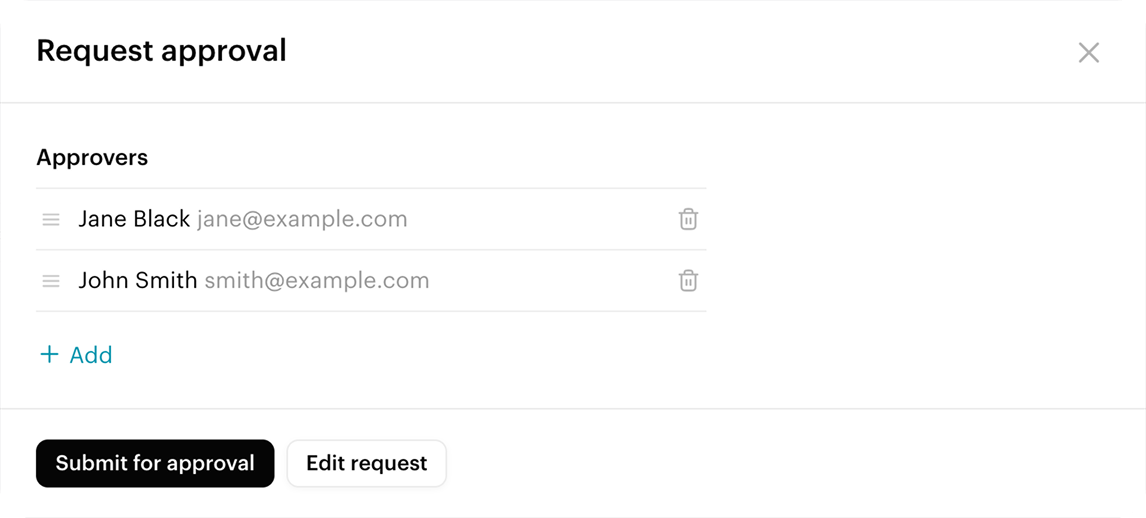
items— a required array. It can be empty. Items do not have an ID: Huntflow identifies each approver by email.- Huntflow removes duplicate emails (case-insensitive) and keeps the first occurrence.
- If the form settings enable "Require at least one approver" and the service
returns an empty list, the user sees an error. The user cannot submit the request
without approvers, unless the user adds approvers manually.
Huntflow treats any other response as an error. If there is no response, a timeout,
or a
5xxstatus, the user can retry the request or fill in the list manually. If the status is4xx, the JSON is invalid, theemailvalue is missing or invalid, or the structure is unexpected, there is no "Try again" option — the user goes straight to filling in the list manually.
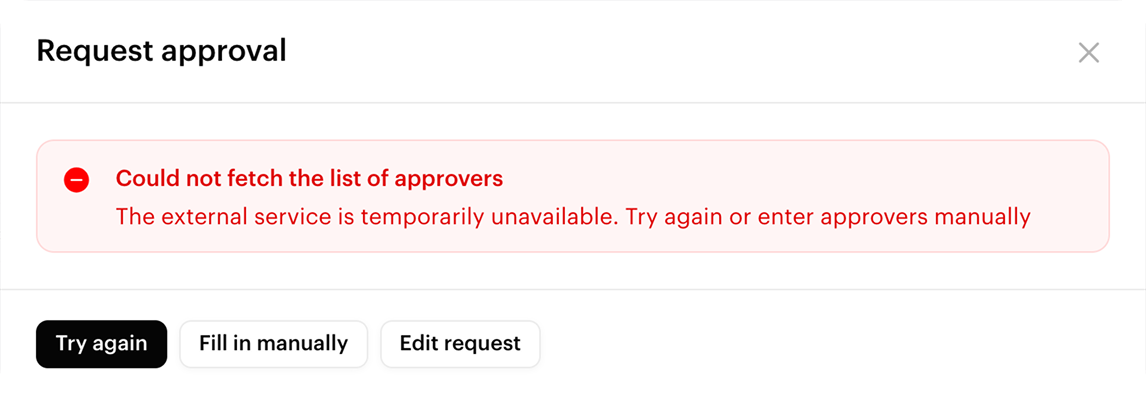
If the Service Is Unavailable
Errors on your service do not block request submission. The user can always continue
by entering the approvers manually. However, if all requests to your service fail
with any error (including 4xx) within one day, Huntflow sends a notification email
to the organization owners. Huntflow sends this email at most once per day.
Implementation Notes
- The request is synchronous. Try to respond within a few seconds, not the full 30 seconds.
- Return
2xxonly when the list of approvers is fully determined. For temporary technical problems on your side, return5xx— the user sees an option to retry the request. For4xx(for example, an authorization or request body problem), Huntflow does not retry the request — the user goes straight to filling in the list manually. - Each request includes an
X-Huntflow-Deliveryheader for debugging. Use this header to match your logs with support requests.